Content on Autopilot: Scheduling Your Marketing Like a Linux Cron Job
In the world of Linux, cron is the silent, unsung hero of automation. It’s a time-based job scheduler that runs in the background, dutifully executing commands at any schedule you can imagine. Want to run a backup every night at 2 AM? Or clear temporary files every Monday morning? cron is your tool.
A cron job definition, found in a file called a crontab, looks cryptic at first but is incredibly powerful:
# ┌───────────── minute (0 - 59)
# │ ┌───────────── hour (0 - 23)
# │ │ ┌───────────── day of the month (1 - 31)
# │ │ │ ┌───────────── month (1 - 12)
# │ │ │ │ ┌───────────── day of the week (0 - 6) (Sunday to Saturday)
# │ │ │ │ │
# │ │ │ │ │
# * * * * *  /path/to/command
This simple line is a complete instruction set: WHEN to do something, and WHAT to do. This philosophy of “fire-and-forget” scheduling is not just for servers—it’s a game-changer for content marketing.
The Manual Treadmill of Content Publishing
For many creators, publishing content is a constant, manual effort. You have a folder of great ideas and finished posts, but the actual act of publishing is reactive. You remember it’s Monday morning and rush to post on LinkedIn. You realize you haven’t posted on Twitter in three days and quickly write a tweet.
This approach is stressful and inconsistent. You’re always on a treadmill, trying to keep up. But what if you could adopt the cron philosophy? What if you could define your entire publishing schedule once and let a system handle the execution?
Your Content Strategy as a crontab
Let’s translate a cron job into a content marketing strategy.
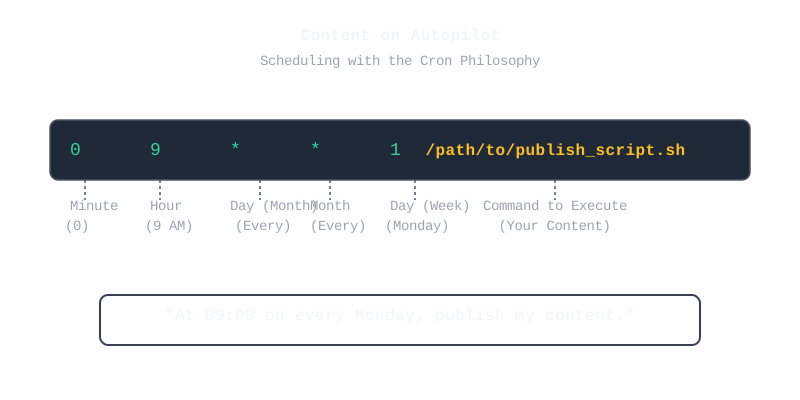
Imagine your content calendar is a crontab file. Each line represents a scheduled piece of content.
- The Schedule (
0 9 * * 1): This is your “when.” It’s the time and date you want your content to go live. Incronterms,0 9 * * 1means “at 09:00 on every Monday.” In content terms, it’s the perfect slot you’ve identified for your weekly LinkedIn article. - The Command (
/path/to/command): This is your “what.” In Linux, it’s a script to be executed. In content marketing, it’s the content itself—the perfectly crafted tweet, the insightful LinkedIn post, the engaging Facebook update.
The biggest challenge for creators isn’t the schedule; it’s having a ready supply of “commands” (content) to execute. Generating high-quality, platform-specific content is the bottleneck.
Automating the “Command” Generation
This is where the modern content workflow connects with the cron philosophy. If you can automate the creation of your content “commands,” you can truly put your marketing on autopilot.
This is the other half of the automation puzzle. While scheduling tools handle the “when,” you need a system to handle the “what.”
This is where the Content Pipeline comes in (as we discussed in our previous post). By using a tool like PostPulsar, you can take a single blog post and automatically generate a dozen different “commands”—a Twitter thread, a LinkedIn post, and more.
The complete, automated workflow looks like this:
- Create Your Source: Write one high-quality blog post.
- Generate Your “Commands”: Use PostPulsar to transform that post into a variety of social media content. You now have a rich supply of ready-to-execute “commands.”
- Load Your
crontab: Add this content to your favorite scheduler (or publish it directly).
You’ve effectively created a system where you define the “what” and the “when” ahead of time, then step back and let the automation run.
Conclusion: Think Like a System Administrator
Stop being a manual publisher and start thinking like a system administrator. Your job isn’t to press the “publish” button every day. Your job is to design a robust, automated system that does it for you.
By combining the scheduling mindset of cron with the automated content generation of a tool like PostPulsar, you can finally get off the content treadmill. You define the strategy, and the system handles the execution.
Ready to build your automated content engine? Sign up for PostPulsar and start generating your content “commands” in minutes.